
Features · Scheduling
Write once. Post to ten networks.
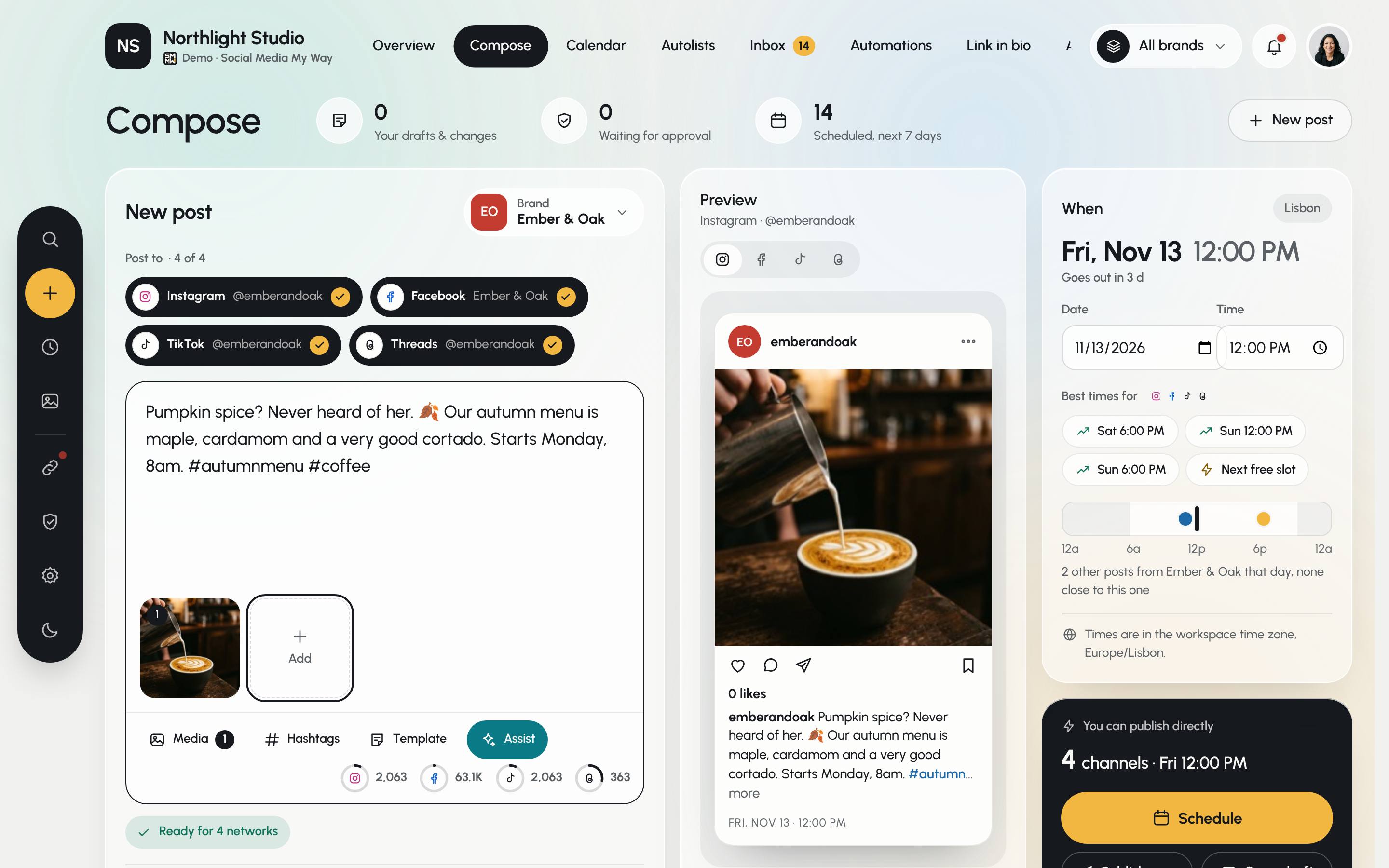
The composer shows each network’s version as you type; the calendar shows the whole month; the publisher sends everything on time and tells you what happened on each network.
How it works
Scheduling, step by step
- Week, month and list views; drag a post to move it
- Instagram grid preview: swap posts until the grid looks right
- Autolists for evergreen posts on a weekly rhythm
- Bulk upload a month from a CSV
- First comment, link and YouTube or Pinterest title
- Videos up to 500 MB, sent in pieces
- Write it oncePick the brand and channels. Each network’s preview and character count update as you type.
- Pick a timeChoose a slot or a suggested best time, in your workspace’s time zone.
- Get it approved, if neededYour approval rule decides whether it waits in Approvals first.
- It goes outEvery minute, due posts are sent. If one network refuses, the others still go, and the post says why.
Questions
Which time zone do posts use?
Your workspace’s, set in Settings. Everyone on the team sees the same times.
What happens if a network is down?
That network’s part fails with the reason, the rest go out, and you can retry the failed one.
Can I post now instead?
Yes. Publish now sends it straight away.
Goes well with
Your content, out there this week.
Try everything free for 14 days, no card needed. Your first post can go out today.